 מעבר לתוכן


But first, what is an animated GIF exactly? According to Techopedia , an animated GIF is “an image encoded in graphics interchange format (GIF), which contains a number of images or frames in a single file and is described by its own graphic control extension.” Basically, it’s a collection of images that loop in order to convey animation. Animated GIFs are a fun feature that will make your handmade sketches come to life.
How To Send GIFs
You can send animated GIFs to Google Drive, Email, Trello, or iMessages, so let’s dig into how…
Choose Your Destination:
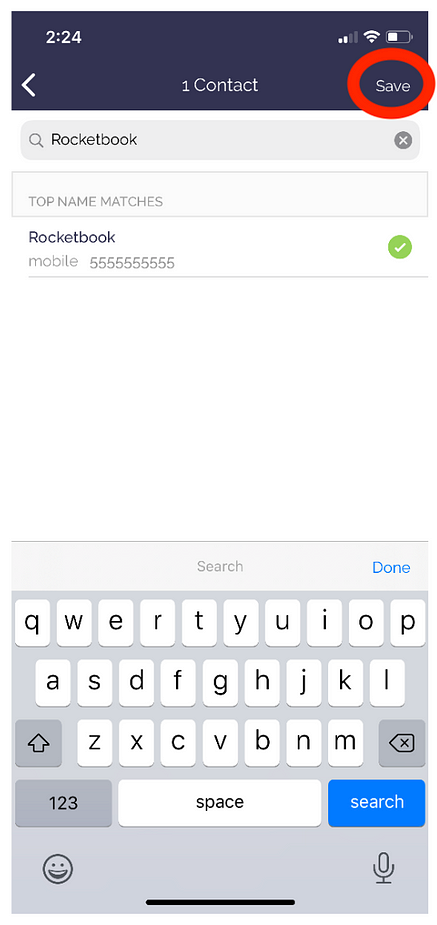
No matter what destination your using, the setup is the same. For this example, we’ll use iMessage.

Select your contact (or folder, email, or board if you’re using different destinations) and tap Save.
Then under File Type, select GIF.

Sending:
1. On your Rocketbook pages, mark the icon that you’d like to group together for an animated GIF. Please note that to in order to have an animation, you’ll need more than 1 scanned page. Otherwise, it’ll just be a single image.
4. The person receiving it will now see a looping animated GIF!
Grab your Rocketbook notebook and give it a shot! It’s actually quite fun!


4 תגובות
My app does not have an animations setting. Is there an update??
Can this be done on android?
What about people who aren’t on iOS? I’m disappointed because the headline makes it sound like the app makes these independently and I want to share them in other places.
I don’t seem to have the option of choosing animation settings within the app. I noticed this article is older. Is this an outdated feature or am I just missing something?